Run Billing Reports
You can:
- Display a list of monthly charge records and invoices
- Generate reports on service usage and charging.
Displaying a List of Monthly Charge Records and Invoices
From the STUDIO main screen, select Monitor > Billing > Charge Records

This displays the monthly list of charges:

Note: the number of columns can vary depending on how your system is configured.
Invoice
Click an item to download a PDF document of monthly invoices showing the total charges for the period, plus the following summary information:
|
Inbound call |
Incoming calls to storm services. |
|
Outbound call |
Outbound calls and their destinations. |
|
Onward termination |
Onward routed calls and their destinations. |
|
Call recording |
Call recording usage for onward routed and SIP trunk calls. |
|
Voice resource |
Calls using UC resources such as internal calls and voicemail retrieval calls. |
|
PBX call recording |
for the UC service. |
|
Non-usage |
Details of one-off charges and recurring monthly licensing fees. |
|
Charges |
An itemised list of all charges for the period. |
Self Bill
Click an item to download a PDF document showing the following:
|
Inbound call summary |
Incoming calls to storm services. |
|
Summary of outpayments |
The rebate received for inbound calls to eligible numbers. |
Charge Records
Click an item to download a CSV file displaying the following:
|
Call ID |
A unique reference number for each call. |
|
PurchaseOrder |
The purchase order associated with this call or transaction. |
|
ServiceType |
A code denoting the type of transaction charge. -1 = monthly recurring charge |
|
Organisation |
A unique ID for the organisation |
|
OrganisationStructure |
The hierarchical structure of the organisation that generated the charge. For instance 1-12-34- shows that the sub-organisation with ID 34 generated the charge. |
|
AccessNumber |
The dialled access number. |
|
CLI |
The originating address of the caller. |
|
ATariffs |
A billing code ID used for looking up the invoice description. |
|
QuantityCharged |
A code associated with the charge amount. |
|
PhaseCharge |
Total phase charges for the call (these may be incurred for different periods of the call). |
|
PointCharge |
Any total fixed charges that may be incurred at certain points during a call. |
|
Charge |
The amount charged for the call. |
|
DurationTotal |
The total call duration in seconds. |
|
StartDateTime |
The start date and time of the call. |
|
BTariffs |
The ID of the tariff used to calculate the charges. |
|
DDI |
The destination number dialled. |
|
Description |
Text description of the type of charge. |
|
MessageParts |
For long SMS messages, the number of parts the message was split into |
|
BillingCompletedDateTime |
The date and time when the transaction was billed. |
|
SubID |
A serial number starting at 0 for each unique call ID. |
|
CLIR |
The caller’s CLI presentation (CLIP) status: 0 = CLI presented 1 = CLI withheld by caller 2 = CLI blocked or not available 3 = reserved |
|
BilledSubOrganisation |
The organisation ID of the sub-organisation that generated the charge. |
|
ClientName |
The billed organisation's name. |
|
AccountNo1 |
A unique account number for the client. |
|
AccountNo2 |
A secondary account number for the client, if applicable. |
|
OriginatingCallID |
A unique ID for the originating (inbound) leg of the call. |
|
SiteName |
The name of the site from which the call was made. |
|
GroupName |
The name of the user group associated with the call. You can create user groups by selecting System Admin > User Groups from the STUDIO main screen. |
Generating Reports on Service Usage and Charging
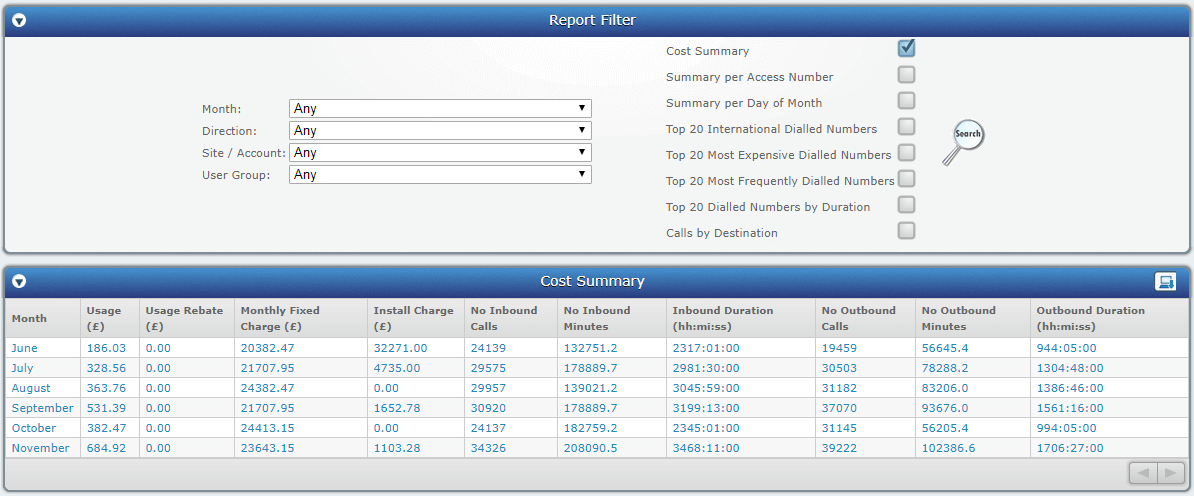
From the STUDIO main screen, select Monitor > Billing > Billing Reports.

This displays the Billing Reports screen on which you can generate reports on service usage and charging by choosing the filters provided and clicking  .
.